Enhancing Digital Art with the Light and Bokeh Brushset for Procreate
Digital illustration offers limitless possibilities, yet one of the most challenging aspects for artists is replicating the organic, ethereal quality of natural light. Whether you are painting a dreamy landscape, designing a whimsical character portrait, or editing photography, adding realistic lighting effects can transform a flat image into a captivating visual experience. This is where specialized tools become essential. The Light and Bokeh Brushset for Procreate provides a streamlined solution for artists who want to introduce sparkle, glow, and depth without spending hours manually painting individual light particles.
For many digital creators, the struggle lies in achieving a balance between artistic control and efficiency. Hand-painting bokeh circles or light flares can be tedious and often results in repetitive, unnatural patterns. By integrating a dedicated brush set designed specifically for these effects, artists can focus more on composition and storytelling rather than getting bogged down in technical minutiae. This article explores how this specific toolset addresses common creative hurdles and enhances the overall quality of digital artwork.
Understanding the Challenge of Digital Lighting
Lighting is not merely about brightness; it is about mood, atmosphere, and direction. In traditional media, artists might use glazing techniques or white gouache to add highlights. In the digital realm, replicating this requires an understanding of layer modes, opacity, and texture. A common pain point for Procreate users is the lack of default brushes that convincingly mimic soft, out-of-focus light sources, known as bokeh, or sharp, twinkling sparkles.
Without the right tools, artists may resort to using standard round brushes with low opacity, which often look muddy or artificial. Alternatively, they might import stock images of light leaks, which can feel disconnected from the original artwork’s perspective and color palette. The goal is to have lighting elements that feel integrated and responsive to the artist’s touch. This is precisely the gap that the Light and Bokeh Brushset for Procreate aims to fill, offering a curated collection of stamps and strokes that behave predictably and beautifully within the iPad environment.
What the Brushset Offers
This comprehensive package contains 18 distinct brushes tailored to add sparkle and light effects to your digital artwork. Unlike generic brush packs that may include hundreds of unused tools, this set is focused on quality and specific utility. The brushes allow you to add bokeh effects or light to your paintings or photos exactly where you want them to be, giving you precise control over the placement and intensity of each element.
In addition to the brushes, the set includes seven high-quality bokeh backgrounds. These are not just random textures but carefully crafted assets that can serve as instant atmospheres for your designs. By providing both active drawing tools and passive background elements, the set supports a wide range of workflows, from detailed illustration to quick photo enhancements.
Practical Applications and Techniques
The versatility of the Light and Bokeh Brushset for Procreate means it can be applied across various genres of digital art. Here are several ways artists can implement these tools effectively:
- Portrait Enhancement: Add subtle sparkles to jewelry, eyes, or hair highlights to draw attention to focal points. Using a soft bokeh brush on a separate layer can create a dreamy halo effect around the subject.
- Landscape Atmosphere: Simulate sunlight filtering through trees or distant city lights at night. The varied sizes of the bokeh brushes help create depth, with larger, softer circles appearing closer and smaller, sharper ones receding into the distance.
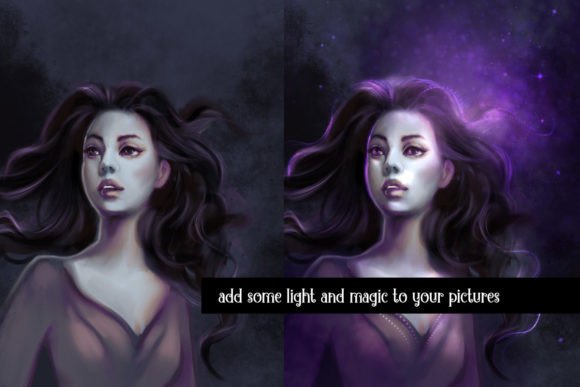
- Fantasy and Magic Effects: Create magical auras, fairy dust, or spellcasting effects. The sparkle brushes are ideal for adding dynamic energy to static illustrations.
- Photo Editing: Enhance smartphone photography by adding artistic light leaks or softening harsh backgrounds with bokeh overlays.
To maximize the impact of the included bokeh backgrounds, place them on a new layer over your artwork. Then, experiment with the layer blend modes. Setting the layer mode to Add or Screen will make the dark parts of the background transparent, leaving only the glowing light elements visible. This non-destructive method allows you to adjust the opacity and color of the light without altering the underlying image.
Installation and Setup Guide
Getting started with the Light and Bokeh Brushset for Procreate is straightforward, but following the correct steps ensures a smooth installation process. First, download the purchase file to your device. You will receive a compressed .zip file. It is crucial to unpack this file first; attempting to import the zip directly will not work.
Once unzipped, locate the .brushset file. Transfer this file to your iPad if you downloaded it on a computer, using AirDrop, iCloud Drive, or email. On your iPad, tap the file and select "Share" or "Open in Procreate." The app will automatically recognize the format and install the set as its own distinct brush category. This organization keeps your brush library tidy and makes it easy to find your new lighting tools during a creative session.
Tailoring the Tools to Your Style
While the brushes are ready to use out of the box, their true power lies in customization. Different users will approach these tools differently based on their artistic goals. For instance, a realist painter might reduce the opacity of the sparkle brushes to 50% to create subtle, barely-there highlights that mimic natural reflection. In contrast, a graphic designer creating a poster might use the brushes at full opacity with vibrant colors to create bold, eye-catching accents.
You are encouraged to change the example graphics to suit your needs. Adjust the hue, saturation, and brightness of the brushes using Procreate’s color panel. Furthermore, combining different brushes from the set can yield unique results. Try layering a large, soft bokeh stamp with a small, sharp sparkle on top to create a complex light source that feels three-dimensional.
Why This Toolset Matters for Your Workflow
Efficiency in digital art does not mean cutting corners; it means removing friction. By using the Light and Bokeh Brushset for Procreate, you eliminate the trial-and-error process of trying to engineer light effects from scratch. This allows you to maintain your creative flow and spend more time on the aspects of art that require human intuition and emotion.
Moreover, consistency is key in professional work. Having a reliable set of brushes ensures that your lighting effects remain cohesive across multiple pieces. Whether you are working on a series of illustrations for a book or maintaining a consistent aesthetic for social media content, these tools provide a dependable foundation for your visual style.
In conclusion, mastering light is a lifelong journey for any artist, but having the right equipment makes the path significantly easier. The Light and Bokeh Brushset for Procreate offers a practical, high-quality solution for adding depth, magic, and realism to your digital creations. By understanding how to install, customize, and apply these brushes, you can elevate your artwork from simple drawings to immersive visual experiences that captivate your audience.