Evaluating Speech Bubble Stamps for Procreate X25 for Digital Creators
In the rapidly evolving landscape of digital illustration, efficiency often dictates the quality and volume of output a creator can achieve. For artists working within the iPad ecosystem, Speech Bubble Stamps for Procreate X25 represents a specialized toolset designed to streamline the creation of comic-style elements and graphic overlays. This collection is not merely a set of static images but a functional brush pack intended to integrate seamlessly into the workflow of professionals, educators, and hobbyists who rely on speed without sacrificing aesthetic consistency.
The core value proposition of this asset lies in its dual utility: it serves both immediate digital crafting needs and long-term commercial applications. Whether you are designing social media graphics, creating educational materials, or preparing files for print-on-demand services, having a reliable library of hand-drawn speech and thought bubbles can significantly reduce production time. This article examines the practical characteristics, usability, and real-world application of these brushes to help you determine if they align with your creative objectives.
Core Characteristics and Design Philosophy
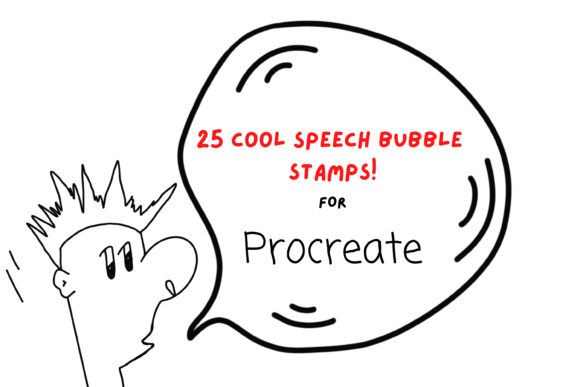
The Speech Bubble Stamps for Procreate X25 pack includes twenty-five unique individual digital brushes. Unlike standard shape tools that often produce sterile, geometrically perfect vectors, these stamps offer a hand-drawn aesthetic. This organic quality is crucial for projects requiring a personal, approachable, or whimsical tone. The collection covers the essential spectrum of conversational indicators, including standard speech bubbles, thought clouds, and shout boxes.
Beyond the primary bubble shapes, the pack includes several accent stamps that add nuanced emotional context to illustrations. These include ‘swearing’ symbols, typing dots (indicating silence or pending text), and exclamation marks. These small details are often overlooked in generic clip art libraries but are vital for creators who need to convey specific tones in comics, memes, or instructional diagrams. The inclusion of these accents demonstrates a thoughtful approach to user needs, anticipating the minor but frequent requirements of visual storytelling.
All brushes in this set are fully resizable and recolorable. This flexibility is a critical feature for professional workflows. A single brush can be scaled down for subtle annotations in a complex diagram or enlarged to serve as the focal point of a greeting card design. The ability to adjust color directly within Procreate’s palette ensures that the elements can match any brand guideline or artistic style guide without requiring external editing software.
Technical Requirements and Installation Process
It is important to clarify the technical constraints before purchasing or downloading. These files are digital brushes specifically engineered for the Procreate app on iPad. They will not function in Photoshop, Clip Studio Paint, or other desktop-based illustration software. To utilize this tool effectively, you must have an iPad compatible with Procreate and an Apple Pencil. While finger painting is possible in Procreate, the precision required for placing and resizing stamp brushes is significantly enhanced by using a stylus.
The installation process requires a basic level of digital file management proficiency. Users need a platform to download the files, such as iCloud Drive, and a utility to unzip the compressed folder, such as iZip or the native Files app functionality on newer iOS versions. Once unzipped, the brushes are imported directly into Procreate, where they appear in a named folder within your brush library. This organization helps maintain a clean workspace, allowing users to locate the tools quickly during intense creative sessions.
For those unfamiliar with importing custom brushes, the learning curve is minimal. However, users should ensure their Procreate app is updated to the latest version to avoid compatibility issues with newer brush formats. This dependency on specific hardware and software means that this product is best suited for individuals already invested in the Apple creative ecosystem.
Practical Applications Across Industries
The versatility of Speech Bubble Stamps for Procreate X25 extends far beyond comic book creation. Its utility spans multiple industries and project types, making it a valuable asset for a diverse range of users.
- Digital Marketing and Social Media: Marketers and content creators can use these stamps to highlight key points in Instagram stories or Pinterest pins. The hand-drawn style feels authentic and less corporate, which often resonates better with audiences seeking genuine connection.
- Education and E-Learning: Educators creating digital worksheets or interactive lessons can use speech bubbles to insert dialogue, questions, or hints. The typing dots are particularly useful for simulating chat interfaces in lessons about digital literacy or social media safety.
- Print on Demand and Merchandise: Designers selling wrapping paper, invitations, or wall art can incorporate these elements into larger patterns. Because the brushes are high-resolution and scalable, they remain crisp when printed on physical goods, provided the canvas size is set correctly for print dimensions.
- Scrapbooking and Digital Journaling: Hobbyists can use the stamps to annotate photos or add narrative elements to digital scrapbooks. The variety of shapes allows for creative layering and composition.
The ability to use these elements for both digital-only outputs and printed goods increases the return on investment. A single purchase can support a wide array of client projects or personal endeavors, reducing the need to source similar assets from multiple vendors.
Usability and Workflow Integration
From a usability standpoint, the stamp format offers distinct advantages over drawing each bubble manually. Consistency is one of the most significant benefits. When creating a multi-page comic or a series of social media posts, maintaining a uniform style for speech bubbles is essential for professional presentation. Using a predefined brush set ensures that every bubble shares the same line weight and texture, eliminating the variability that comes with freehand drawing.
Resizing is handled through Procreate’s intuitive interface. Users can adjust the brush size via the slider or use the transform tool to stretch and distort the stamp after placement. This post-placement flexibility allows for dynamic compositions where bubbles might need to wrap around characters or fit into tight spaces. However, it is worth noting that excessive stretching can sometimes distort the hand-drawn texture, so moderate adjustments yield the best results.
The reliability of these brushes contributes to a smoother workflow. There is no lag or rendering delay associated with simple stamp brushes, even on older iPad models. This responsiveness is crucial for maintaining creative flow, especially when working under tight deadlines. The straightforward nature of the tool means there is little room for error, making it accessible to beginners while still being efficient enough for seasoned professionals.
Limitations and Considerations
While Speech Bubble Stamps for Procreate X25 offers considerable value, it is not without limitations. The primary constraint is its exclusivity to the Procreate environment. Artists who work across multiple platforms or prefer vector-based workflows in Adobe Illustrator may find this tool less useful. Additionally, because these are raster-based brushes, extremely large-scale prints may require careful attention to canvas resolution to prevent pixelation.
Another consideration is the stylistic specificity. The hand-drawn, cartoonish aesthetic may not suit projects requiring a minimalist, corporate, or hyper-realistic look. Users should evaluate whether this visual style aligns with their brand identity or project requirements before integrating it into their permanent toolkit.
Final Assessment
For iPad-based creators, Speech Bubble Stamps for Procreate X25 is a practical, high-utility resource. It addresses a common pain point in digital illustration—the time-consuming nature of creating consistent, attractive speech bubbles—by providing a ready-made, customizable solution. Its strength lies in its simplicity, flexibility, and broad applicability across various creative fields.
If your workflow involves regular creation of comics, educational content, social media graphics, or printed merchandise, this brush pack offers a tangible improvement in efficiency. It allows you to focus more on content and composition rather than repetitive element creation. While it requires specific hardware and software, the investment is justified by the time saved and the professional consistency it brings to your projects. For those already operating within the Procreate ecosystem, this tool is a logical and beneficial addition to your digital arsenal.