Master Men's Hairstyles with Procreate Stamps
Digital illustration offers unparalleled freedom, yet certain elements remain stubbornly time-consuming. Hair, in particular, is often the bottleneck for character designers and portrait artists. Rendering realistic strands, managing volume, and ensuring consistent lighting can turn a quick sketch into an hours-long ordeal. This is where specialized tools like the Man Hairstyle Brush Stamp Procreate set change the workflow entirely. By integrating pre-designed, high-quality hair stamps directly into your digital canvas, you bypass the tedious manual rendering process without sacrificing artistic integrity.
For professionals and hobbyists alike, efficiency is not just about speed; it is about maintaining creative momentum. When you spend less time drawing individual locks of hair, you have more mental energy to focus on expression, composition, and narrative. This toolset is designed specifically for the iPad ecosystem, leveraging the intuitive touch interface of Procreate to deliver instant, customizable results.
Streamlining Character Design Workflow
The primary value of this brush set lies in its ability to accelerate the iteration process. In commercial illustration, clients often request multiple variations of a character before settling on a final look. Traditionally, redrawing hair for each variation is exhausting. With the Man Hairstyle Brush Stamp Procreate collection, you can swap hairstyles in seconds. This allows for rapid prototyping of character concepts, making it easier to present diverse options to stakeholders or clients.
Consider the freelance illustrator working on a tight deadline. Instead of spending forty minutes detailing a fade or a pompadour, they can apply a stamp, adjust the size and rotation, and use standard Procreate blending modes to integrate it seamlessly with the head shape. The result is a professional-grade finish achieved in a fraction of the time. This efficiency translates directly to higher productivity and the ability to take on more projects without burning out.
Key Features and Technical Compatibility
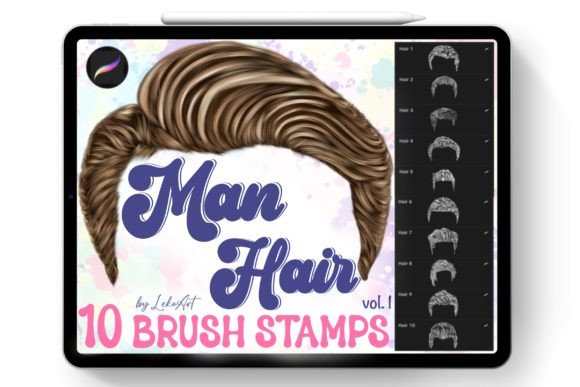
Understanding the technical specifications is crucial before integrating any new asset into your library. This product includes a single zip file containing the Man hairstyle.brushset. It is essential to note that these brushes are engineered exclusively for Procreate on iPad. They will not function in Photoshop, Clip Studio Paint, or other desktop-based painting programs. This specificity ensures that the brushes leverage Procreate’s unique engine for texture and pressure sensitivity, providing a smooth user experience that generic image overlays cannot match.
The set comprises ten distinct hairstyle stamps. These are not merely static images but dynamic brushes that respond to your input. Upon downloading, the installation process is streamlined for iOS users. You simply open the file on your iPad, and it automatically imports into Procreate. There is no need for complex folder management or manual installation scripts. Once imported, the brush set is immediately ready for use, allowing you to jump straight into creation.
Practical Applications Across Industries
The utility of these brushes extends beyond simple character art. Various professionals can leverage this tool to enhance their output quality and consistency.
- Comic Book Artists: Consistency is key in sequential art. Using stamps ensures that a character’s hair looks identical from panel to panel, even when drawn at different angles or by different assistants.
- Game Developers: Concept artists can quickly generate diverse character rosters for indie games, focusing on silhouette and color palette rather than getting bogged down in minute details during the early design phases.
- Educators and Tutors: Art instructors can use these stamps to demonstrate hair structure and flow to students, providing a base layer that students can then refine or paint over to learn shading techniques.
- Marketing Agencies: For creating avatars or illustrative content for social media campaigns, these brushes allow for the rapid production of diverse male characters, representing various styles and demographics efficiently.
Enhancing Visual Communication and Branding
In the realm of digital branding, visual consistency helps establish identity. Whether you are designing a mascot for a tech startup or creating illustrations for a men’s grooming blog, the style of hair communicates significant information about personality and target audience. The Man Hairstyle Brush Stamp Procreate set offers styles that range from classic cuts to modern trends, enabling creators to align visual elements with brand messaging accurately.
Moreover, the ability to customize these stamps ensures that your work does not look generic. By adjusting opacity, using clipping masks, and applying custom colors, you can tailor each stamp to fit the specific lighting and aesthetic of your piece. This balance between convenience and customization is what separates useful assets from restrictive templates.
Best Practices for Natural Results
While stamps provide a powerful shortcut, achieving a natural look requires technique. Simply placing a stamp on a head often results in a flat, sticker-like appearance. To avoid this, consider the following practical recommendations:
- Match the Perspective: Ensure the angle of the hair stamp aligns with the tilt of the head. Procreate’s transform tools allow you to rotate and distort the stamp to fit the perspective perfectly.
- Integrate with Lighting: Use blending modes such as Multiply for shadows and Overlay or Screen for highlights. This helps the hair interact with the light source in your scene, making it feel part of the environment rather than pasted on top.
- Refine the Hairline: Use a soft eraser or a standard painting brush to soften the edges where the hair meets the forehead and neck. This breaks up the hard edges of the stamp and creates a more organic transition.
- Layering: Don’t be afraid to combine multiple stamps or paint additional strands over the stamp to add unique details. This hybrid approach maintains speed while adding personal artistic flair.
Evaluating Value for Your Toolkit
When deciding whether to add this set to your digital arsenal, consider your current pain points. If you frequently struggle with hair anatomy or find yourself delaying projects due to the complexity of rendering textures, this tool offers immediate relief. It is particularly valuable for those who prioritize output volume without compromising on professional standards.
However, it is important to view these brushes as aids rather than replacements for fundamental skills. Understanding how hair grows, flows, and reacts to gravity will help you use these stamps more effectively. The best results come when technical knowledge informs the use of digital shortcuts.
If you have any questions regarding compatibility or usage tips, reaching out to the shop owner is recommended. Clear communication ensures that you get the most out of your purchase. Thank you for visiting my shop, and happy creating. By integrating the Man Hairstyle Brush Stamp Procreate set into your workflow, you invest in a smoother, more efficient creative process that empowers you to bring your character visions to life with confidence and speed.