Pollen Procreate Brush Stamp: A Practical Guide for Digital Designers
Digital illustration has evolved significantly with the introduction of specialized tools that streamline the creative process. Among these tools, stamp brushes have become essential for artists who need to create intricate patterns, textures, and decorative elements efficiently. The Pollen Procreate Brush Stamp set is one such resource designed to assist users in generating organic, nature-inspired designs with minimal effort. This article evaluates the utility, installation process, and practical applications of this brush set to help digital artists determine if it aligns with their workflow and artistic goals.
Understanding the Pollen Procreate Brush Stamp Set
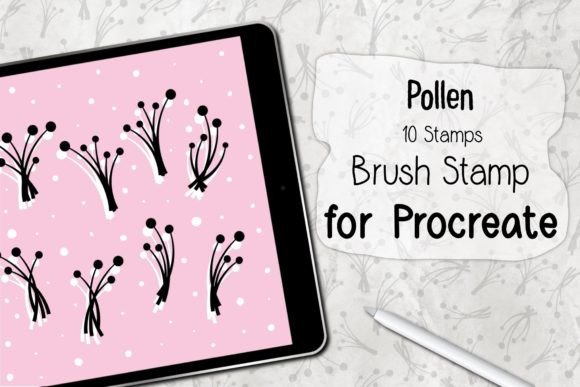
The Pollen Procreate Brush Stamp is a digital asset package specifically engineered for the Procreate application on iPad. It consists of ten distinct stamp brushes that replicate the appearance of pollen grains, spores, or fine particulate matter. These stamps are not traditional painting brushes that rely solely on stroke dynamics; rather, they are pre-defined shapes that can be placed instantly onto the canvas. This distinction is crucial for users evaluating the tool, as it shifts the workflow from manual drawing to strategic placement and composition.
The primary value proposition of this set lies in its ability to save time. Creating realistic organic textures manually can be labor-intensive, requiring repetitive strokes and careful attention to detail. By using a stamp brush, artists can achieve consistent results instantly. The set is delivered as a ZIP file containing a single .brushset file, which encapsulates all ten variations. This format ensures that the brushes are organized and easy to manage within the Procreate library.
Key Benefits and Workflow Efficiency
For designers and illustrators, time management is often as important as artistic skill. The Pollen Procreate Brush Stamp offers several advantages that contribute to a more efficient workflow:
- Instant Pattern Creation: Users can generate complex backgrounds or textures rapidly. This is particularly useful for creating greeting cards, social media graphics, or packaging designs where background elements need to be visually appealing but not overly dominant.
- Consistency: Manual drawing can lead to variations in shape and size that may look unintentional. Stamp brushes provide uniformity, ensuring that each element matches the intended aesthetic perfectly.
- Ease of Use: The learning curve for stamp brushes is minimal. Unlike complex custom brushes that require adjustment of settings like streamline, pressure sensitivity, and jitter, stamp brushes are generally ready to use immediately after installation.
- Versatility in Composition: The ten different stamps included in the set allow for variety. Artists can layer different stamps to create depth and visual interest, avoiding the repetitive look that can occur when using a single shape.
These benefits make the set an attractive option for both beginners who are still mastering manual drawing techniques and experienced professionals looking to speed up their production pipeline.
Technical Requirements and Compatibility
Before purchasing or downloading the Pollen Procreate Brush Stamp, it is essential to verify that your hardware and software meet the necessary requirements. Since this is a native Procreate asset, it is not compatible with other digital art applications such as Adobe Fresco, Clip Studio Paint, or Photoshop on desktop.
The specific requirements include:
- Device: An iPad Pro or any standard iPad model capable of running the latest versions of iOS and Procreate.
- Stylus: An Apple Pencil or a compatible, pressure-sensitive stylus. While stamp brushes do not always rely heavily on pressure for shape variation, a pressure-sensitive device provides better control over opacity and size if the brush settings allow for it.
- Software: Procreate Version 5.0 or higher. Older versions may not support the .brushset file format or may lack the rendering engine necessary to display the stamps correctly.
Users should note that these brushes will ONLY work within the Procreate application. Attempting to import them into other software will result in errors or incompatibility messages. This limitation is a significant consideration for artists who work across multiple platforms.
Installation Process
Installing the Pollen Procreate Brush Stamp is a straightforward process designed to be user-friendly. The steps are as follows:
- Download and Unzip: After acquiring the file, download the ZIP archive to your iPad. Use the Files app to unzip the archive, revealing the .brushset file inside.
- Open in Procreate: Tap on the .brushset file and select "Open in Procreate" from the share sheet. Alternatively, you can import it directly through the Procreate brush library by selecting "Import" from the brush set menu.
- Automatic Installation: Procreate will automatically install the brush set. It will appear in your Brush Library, typically at the top of the list or in a newly created folder.
- Verification: Open a new canvas and select the newly installed brush set to ensure all ten stamps are accessible and functioning correctly.
This seamless installation process reduces friction for users, allowing them to start creating immediately without technical hurdles.
Ideal Use Cases and Limitations
Understanding where the Pollen Procreate Brush Stamp fits best helps in making an informed decision. This tool is a strong fit for:
- Greeting Card Design: The organic, delicate nature of pollen stamps makes them ideal for floral-themed cards, wedding invitations, and spring-themed designs.
- Pattern Making: Artists can create seamless patterns for textiles, wallpapers, or digital backgrounds by repeating and rotating the stamps.
- Textural Overlays: The stamps can be used as overlays on photographs or illustrations to add a grainy, natural texture that enhances the overall mood of the piece.
However, there are situations where alternatives may be worth considering. If an artist requires highly customized, irregular shapes that change dynamically with every stroke, a procedural brush with high randomness settings might be more appropriate. Additionally, if the goal is to create large-scale, bold illustrations, small pollen stamps may lack the visual impact needed unless scaled significantly, which could result in pixelation if not vector-based (though Procreate is raster-based).
Making the Decision
When evaluating whether to incorporate the Pollen Procreate Brush Stamp into your toolkit, consider your current project needs. If you frequently create nature-inspired designs, patterns, or decorative elements, this set offers a safe and time-efficient solution. It eliminates the need to draw each element manually, allowing you to focus on composition and color theory.
Conversely, if your work primarily involves character design, hard-surface modeling, or abstract expressionism where organic textures are rarely used, the utility of this specific set may be limited. In such cases, investing in a broader library of general-purpose brushes might provide more value.
Ultimately, the Pollen Procreate Brush Stamp is a specialized tool that excels in its niche. It provides a reliable, easy-to-use method for adding delicate, organic details to digital artwork. By understanding its capabilities, requirements, and ideal applications, artists can make a confident decision about whether it supports their creative objectives.
♥♥ Thanks you ♥♥