Streamline Your Holiday Digital Art with Christmas and Helloween Procreate Stamps
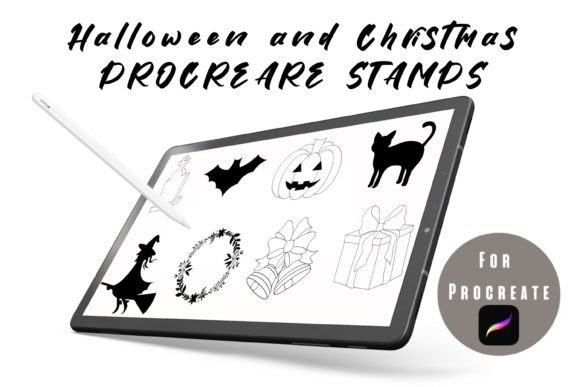
If you have ever spent hours trying to hand-draw a perfect pumpkin or a symmetrical snowflake on your iPad, only to delete it because the lines looked shaky, you understand the value of efficiency in digital art. The Christmas and Helloween Procreate Stamps are not just decorative elements; they are time-saving tools designed specifically for creators who want to maintain high-quality aesthetics without sacrificing their sanity during busy seasons. These sets include 13 Christmas stamps and 12 Halloween stamps, crafted exclusively for use within the Procreate app.
Unlike standard image files that you might drag and drop as static layers, these stamp brushes integrate directly into your workflow. This means you can change colors, add details, or erase parts of the stamp just as you would with any other brush stroke. For digital planners, illustrators, and social media managers, this flexibility is crucial. It allows for a cohesive look that feels custom-made rather than copied and pasted from a generic clip-art library.
Why Seasonal Stamps Matter for Digital Creators
The period between October and December is arguably the busiest time for content creators and small business owners. Audience engagement spikes, but so does the demand for fresh, relevant content. Using Christmas and Helloween Procreate Stamps helps bridge the gap between professional quality and rapid production. When you are managing a blog, an Etsy shop, or an Instagram account, consistency is key. These stamps provide a visual anchor that signals seasonality without requiring you to start from scratch every single day.
Consider the mental load of creative decision-making. By having a pre-designed set of thematic elements, you remove the friction of "what should I draw today?" You can focus instead on composition, color theory, and messaging. This is particularly beneficial for educators and freelancers who may not consider themselves full-time illustrators but still need to produce visually appealing materials for students or clients.
Practical Use Cases Across Different Professions
The versatility of these stamp brushes extends far beyond simple greeting cards. Here is how different users can leverage these tools in real-world scenarios:
- Digital Planners and Journalers: If you sell or use digital planners on GoodNotes or Notability, these stamps are invaluable. You can quickly decorate monthly spreads for October and December. A simple pumpkin stamp can mark a harvest festival event, while a Christmas wreath can highlight holiday deadlines. Because you can change the colors, you can match the stamps to your existing planner theme, whether it is pastel, dark mode, or vibrant neon.
- Social Media Managers: Engagement often relies on timely visuals. Instead of searching for stock photos that everyone else is using, you can create unique story backgrounds or post overlays. Use the Halloween stamps to create spooky quotes for October 31st, or use the Christmas stamps to design festive sale announcements. The ability to erase details means you can simplify a complex stamp to fit better in a small mobile screen layout.
- Educators and Homeschooling Parents: Creating worksheets and reward charts becomes significantly faster. You can use the Christmas stamps to create a countdown calendar or decorate math problems with a holiday twist. For younger students, the visual appeal of familiar symbols like ghosts or Santa hats can increase motivation and make learning materials feel less sterile.
- Small Business Owners: If you run an online store, your packaging inserts and thank-you notes need seasonal updates. Using Procreate, you can design digital mockups of your products with festive borders or icons. This helps potential customers visualize how your brand participates in the holiday spirit, fostering a stronger emotional connection.
Maximizing the Flexibility of Stamp Brushes
One of the most significant advantages of these Christmas and Helloween Procreate Stamps is their editability. Many beginners make the mistake of treating stamps as rigid images. However, because they function as brushes, you have complete control. If a Halloween bat stamp is too detailed for your minimalist design, you can use the eraser tool to remove the wings' veins, leaving a simple silhouette. If the red in a Christmas bow clashes with your palette, you can adjust the hue and saturation instantly.
This level of customization ensures that your work remains original. You are not just inserting a clip-art image; you are integrating a base element into your unique artistic voice. This is essential for maintaining brand identity. For instance, a blogger who usually uses muted earth tones can adjust the bright greens and reds of the Christmas stamps to fit their aesthetic, ensuring that their holiday content does not look disjointed from their regular posts.
Technical Considerations Before You Begin
Before downloading and using these assets, it is important to remember that they are ONLY FOR PROCREATE. They will not work in Photoshop, Illustrator, or other graphic design software unless you export them as PNGs after placing them in Procreate. This limitation is actually a strength for iPad users, as it ensures optimization for the Apple Pencil’s pressure sensitivity and the app’s layer structure.
Ensure your iPad is updated to a version of Procreate that supports current brush formats. While these stamps are lightweight, having sufficient storage space on your device is always wise if you plan to build a large library of resources. Additionally, take a moment to organize your brush sets. Create a specific group for "Seasonal Stamps" so you can access the 13 Christmas and 12 Halloween designs quickly when inspiration strikes.
Enhancing Your Creative Workflow
Integrating these stamps into your routine does not mean you stop drawing by hand. Instead, think of them as foundational elements. You might stamp a basic Christmas tree and then hand-draw ornaments over it. Or, you could place a Halloween moon stamp and paint atmospheric clouds around it. This hybrid approach combines the speed of digital assets with the warmth of hand-created art.
For those new to Procreate, experimenting with these stamps is a low-risk way to learn about layer modes and blending. Try placing a stamp on a separate layer and changing its blend mode to "Multiply" or "Overlay" to see how it interacts with textured backgrounds. This experimentation can lead to unexpected and beautiful results that elevate your digital planning and design work.
Ultimately, the Christmas and Helloween Procreate Stamps are about reclaiming your time during the most demanding months of the year. Whether you are a hobbyist looking to add flair to your digital journal or a professional designer needing quick assets for client projects, these tools offer a practical, flexible solution. By reducing the technical barrier to creating seasonal art, they allow you to focus on what truly matters: connecting with your audience through meaningful, visually engaging content.