Unlocking Digital Texture: A Comprehensive Guide to the Jelly Fish Brush
In the rapidly evolving landscape of digital art and graphic design, tools are no longer just utilities; they are extensions of the artist’s intent. Among the myriad of specialized instruments available today, the Jelly Fish Brush has emerged as a unique asset for creators seeking organic, fluid, and translucent effects. Whether you are a seasoned illustrator working in Photoshop, Procreate, or Clip Studio Paint, or a beginner exploring the nuances of digital texture, understanding how this specific brush functions can significantly elevate your workflow.
This article explores the essence of the Jelly Fish Brush, its practical applications, and exactly what you receive when you download this digital asset. By demystifying the technical aspects and highlighting creative use cases, we aim to provide a clear, educational resource that helps you integrate this tool into your artistic repertoire effectively.
What Is the Jelly Fish Brush?
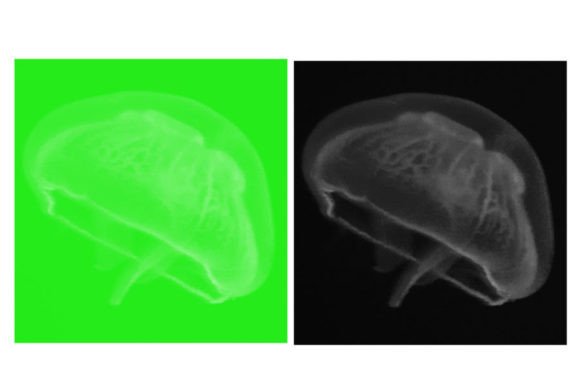
At its core, the Jelly Fish Brush is a custom digital brush preset designed to mimic the semi-transparent, gelatinous, and flowing characteristics of marine life, specifically jellyfish. Unlike standard round or square brushes that produce solid, opaque strokes, this brush is engineered with specific settings for opacity, flow, scattering, and texture mapping. The result is a stroke that feels soft, ethereal, and slightly irregular, capturing the delicate nature of underwater organisms.
The significance of such a specialized brush lies in its ability to save time. Creating realistic water effects, slime, glass, or organic tissue from scratch using standard tools requires meticulous layering and masking. The Jelly Fish Brush encapsulates these complex textures into a single stamp or stroke, allowing artists to achieve high-fidelity results with minimal effort. It bridges the gap between conceptual sketching and polished rendering, making it an invaluable resource for concept artists, character designers, and environmental illustrators.
The Technical Mechanics Behind the Effect
To truly appreciate the utility of this brush, it is helpful to understand what is happening under the hood. Digital brushes are defined by a set of parameters. For a "Jelly Fish" effect, the creator typically adjusts:
- Opacity Jitter: This ensures that parts of the stroke are more transparent than others, creating depth and a sense of volume without solid lines.
- Shape Dynamics: This controls how the brush tip rotates and scales as you draw, preventing repetitive patterns and adding natural variation.
- Texture Overlay: Many versions of this brush include a subtle noise or cloud texture to break up uniformity, mimicking the biological imperfections found in nature.
When you utilize this brush, you are not just painting color; you are painting light and transmission. This distinction is crucial for beginners who may struggle with why their digital paintings look "flat." Incorporating tools that inherently handle transparency helps train the eye to see value and saturation differently.
🔥 What’s Included in This Brush Set
One of the most common questions among digital artists purchasing or downloading assets is regarding file compatibility and content clarity. Transparency in deliverables is key to a smooth user experience. When you acquire this specific Jelly Fish Brush package, you are receiving a streamlined, efficient toolkit designed for immediate integration into your software.
Here is a detailed breakdown of the contents:
- The ZIP File: The entire package is compressed into a single ZIP archive. This ensures that all components remain organized and protected during download. You will need to extract this file before installation.
- File Formats (.brushes or .swatches): Inside the extracted folder, you will find the core asset files. Depending on the target software (such as Adobe Photoshop or Procreate), these will be in native formats like
.abr,.brushset, or.swatches. These formats ensure that the brush retains its pressure sensitivity and dynamic settings. - Quantity – 1 Brush: This set focuses on quality over quantity. It includes one highly optimized Jelly Fish Brush. Rather than overwhelming users with dozens of mediocre variations, this single preset has been refined to perform exceptionally well across various canvas sizes and resolutions.
Note: Always check the readme file included in the ZIP folder for specific installation instructions tailored to your version of the software. Compatibility can vary between major updates of creative suites.
Practical Applications in Modern Creativity
While the name suggests a marine focus, the versatility of the Jelly Fish Brush extends far beyond ocean scenes. In modern digital workflows, texture brushes are multipurpose tools. Here are several ways professionals and hobbyists alike are leveraging this asset:
1. Fantasy and Sci-Fi Concept Art
In genre illustration, artists often need to depict alien biology, magical auras, or energy fields. The translucent, glowing quality of the Jelly Fish Brush is perfect for rendering bioluminescent creatures or mystical fog. It allows for quick blocking-in of atmospheric elements that would otherwise take hours to render manually.
2. Abstract Backgrounds and Textures
Graphic designers working on web backgrounds, album covers, or poster art can use this brush to add organic depth to geometric compositions. By layering the brush with different blend modes—such as Screen, Overlay, or Soft Light—you can create complex, dreamlike gradients that feel alive and dynamic.
3. Educational and Scientific Illustration
For those in educational publishing or scientific visualization, accuracy combined with aesthetic appeal is vital. This brush can help illustrate cellular structures, microscopic organisms, or fluid dynamics in a way that is both scientifically suggestive and visually engaging for students.
Common Misunderstandings and Best Practices
Despite its simplicity, there are misconceptions about how specialized brushes should be used. Clarifying these can help you get the most out of your download.
Misconception 1: "One brush fits all resolutions."
While the Jelly Fish Brush is versatile, digital brushes are resolution-dependent. If you scale your canvas up significantly after painting, the texture may pixelate. Best Practice: Always set your canvas to the final desired resolution before beginning your stroke work.
Misconception 2: "It replaces fundamental skills."
Some beginners assume that downloading a texture brush eliminates the need to learn lighting and anatomy. This is false. The brush is a tool, not a crutch. It enhances your existing skills but cannot compensate for a lack of understanding regarding form and perspective. Best Practice: Use the brush to accentuate forms you have already structured correctly.
Misconception 3: "It only works with a stylus."
While a pressure-sensitive tablet provides the best control over opacity and size, the Jelly Fish Brush can still yield interesting results with a mouse if you adjust the opacity slider manually between strokes. However, for the true "flow" effect, a digital pen is recommended.
Integrating the Brush into Your Workflow
To seamlessly incorporate the Jelly Fish Brush into your daily creative routine, consider the following steps:
- Experiment with Blend Modes: Do not limit yourself to the "Normal" blend mode. Try painting on a new layer set to "Add" or "Color Dodge" to create glowing effects, or "Multiply" for deep, submerged shadows.
- Layering is Key: One stroke rarely creates a finished look. Build up density by layering multiple passes. Vary the color slightly between layers to create iridescence.
- Combine with Standard Brushes: Use hard-edged brushes to define the silhouette of your subject, then use the Jelly Fish Brush to fill in the internal texture and atmosphere. This contrast between hard and soft edges creates visual interest.
Conclusion
The Jelly Fish Brush represents more than just a digital stamp; it is a gateway to exploring translucency, organic texture, and atmospheric depth in your artwork. By providing a focused, high-quality tool within a simple ZIP package containing 1 Brush and the necessary .brushes or .swatches files, this asset removes technical barriers and allows you to focus on creativity.
Whether you are illustrating a deep-sea documentary, designing a fantasy game environment, or simply experimenting with abstract forms, understanding the capabilities and limitations of this tool empowers you to make informed artistic choices. As digital art continues to merge with technology and education, having a diverse toolkit of specialized brushes ensures that your work remains competitive, engaging, and visually stunning. Download, install, and start experimenting—the ocean of possibilities is vast.