Little Leaves Procreate Brush Stamp Guide
Digital illustration often suffers from a common paradox: the infinite canvas can feel paralyzing. When every pixel is under your control, the pressure to create perfection from scratch can stifle spontaneity. This is where specialized tools like the Little Leaves Procreate Brush Stamp collection become invaluable. Rather than replacing artistic skill, these stamps serve as creative accelerators, allowing illustrators, designers, and hobbyists to build complex natural scenes with speed and consistency. By integrating organic textures directly into your workflow, you free up mental energy to focus on composition, lighting, and storytelling.
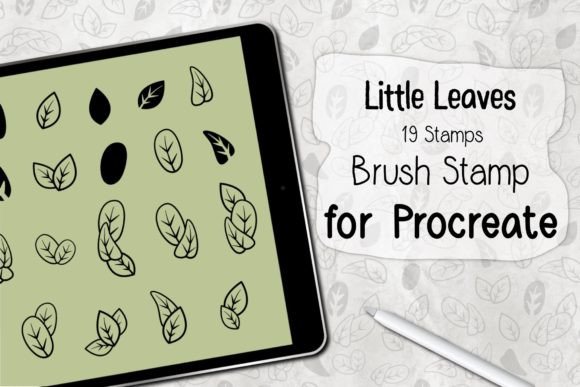
The appeal of botanical elements in design is timeless. Leaves represent growth, nature, and tranquility, making them versatile assets for a wide range of projects. However, hand-drawing dozens of unique leaf variations can be tedious and time-consuming. The Little Leaves set addresses this by providing nineteen distinct, high-quality stamps that capture the subtle irregularities of real foliage. These are not rigid, repetitive clip-art images; they are dynamic brushes designed to respond to your input, offering a balance between convenience and artistic control.
Understanding the Toolset
Before diving into creative applications, it is essential to understand what this tool actually is. The Little Leaves Procreate Brush Stamp package is a digital asset specifically engineered for the Procreate ecosystem. It is not a standalone app or a generic image file. It is a .brushset file containing nineteen individual stamp brushes. Each brush is calibrated to work seamlessly with Apple’s pressure-sensitive technology.
To use this set effectively, you need an iPad Pro or a compatible iPad model paired with an Apple Pencil or a similar pressure-sensitive stylus. The software requirement is strict: you must have Procreate version 5.0 or higher installed. This ensures that the brush engine can interpret the data correctly, allowing for smooth rotation, scaling, and opacity changes based on how you hold and press your stylus. The installation process is straightforward but requires attention to detail. After downloading the ZIP file, you must unzip it to reveal the .brushset file. Tapping this file and selecting "Open in Procreate" will automatically import the entire set into your Brush Library. There is no manual configuration needed, which makes it accessible even for those who are not technically inclined.
Creative Applications for Designers and Illustrators
Once installed, the possibilities for using the Little Leaves Procreate Brush Stamp expand far beyond simple background decoration. For surface pattern designers, these stamps are foundational elements. You can create seamless repeats for textiles, wallpaper, or packaging by scattering the leaves in varied orientations and sizes. The key to success here is layering. Use larger, darker leaves for the foreground and smaller, lighter ones for the background to create depth. Because there are nineteen different shapes, you can avoid the "tiling" look that plagues lesser stamp sets.
For character artists and concept designers, foliage is often used to frame subjects or establish mood. A portrait surrounded by delicate ferns or broad monstera leaves instantly communicates a connection to nature. Instead of painting each vein individually, you can use the stamps to block in the general shape and density of the greenery, then refine specific areas with standard drawing brushes. This hybrid approach saves hours of work while maintaining a hand-crafted aesthetic. The stamps work particularly well for creating wreaths, borders, and decorative dividers for editorial layouts or wedding invitations.
Enhancing Social Media and Marketing Content
Content creators and social media managers frequently need fresh visuals that align with brand aesthetics. Botanical themes are perennially popular because they evoke calmness and authenticity. Using the Little Leaves set, you can quickly generate unique backgrounds for Instagram stories, Pinterest pins, or blog headers. By adjusting the color palette of the brushes to match your brand colors, you maintain consistency across platforms. For example, a wellness coach might use soft sage greens and muted earth tones, while a vibrant lifestyle brand might opt for bold teals and yellows.
These stamps are also excellent for creating mockups. If you are selling digital planners or printable art, adding subtle leaf accents around the edges of your product images can make them feel more tangible and appealing. It adds a layer of polish that suggests care and attention to detail, which can significantly influence purchasing decisions. The versatility of the nineteen included shapes means you can tailor the density of the foliage to suit different formats, from the vertical space of a story to the horizontal banner of a YouTube thumbnail.
Technical Tips for Best Results
To get the most out of the Little Leaves Procreate Brush Stamp, consider how Procreate’s brush settings interact with stamp tools. While the brushes are pre-configured, you can still adjust size, opacity, and flow in the top toolbar. For a more natural look, vary the opacity slightly as you stamp. This mimics the way light filters through real leaves, where some are translucent and others are solid. Additionally, utilize the "Transform" tool after stamping to rotate and resize individual leaves manually if you need precise placement.
Color experimentation is another critical aspect. Do not limit yourself to green. Try using deep purples, burnt oranges, or even metallic golds to create seasonal themes or abstract compositions. The stamps retain their shape regardless of color, allowing you to repurpose the same assets for autumn harvest designs or winter holiday cards. Remember that these brushes work only within the Procreate application, so plan your workflow accordingly. If you need to export assets for use in other software like Photoshop or Illustrator, ensure you are working at a high resolution to maintain clarity when scaling.
Who Benefits Most from This Set?
This toolset is particularly beneficial for freelancers and small business owners who need to produce high-volume content without sacrificing quality. Educators creating worksheets or presentation slides can use the leaves to break up text and add visual interest without distracting from the educational material. Hobbyists who enjoy digital journaling or scrapbooking will find the stamps perfect for adding decorative elements to daily logs. Even experienced illustrators can benefit by using these stamps as underpaintings or texture layers to speed up their initial sketching phase.
The value lies in the balance between automation and artistry. The Little Leaves Procreate Brush Stamp does not do the thinking for you; it provides the raw materials. Your creative direction determines whether the result looks like a generic clip-art collage or a sophisticated, layered illustration. By mastering the placement, color, and layering of these nineteen stamps, you can elevate your digital artwork, making it more engaging, professional, and visually cohesive. Whether you are designing a logo, illustrating a children’s book, or simply decorating a digital planner, these tools offer a practical path to richer, more organic designs.